Please Don't Spearphish Me (Creating an Obsidian Plugin)
#digitalgarden #obsidian #cybersecurity #privacy #project #coding #miniproject
Anytime I make a new public appearance (like making a new social media account, or this blog) I ask myself: am I revealing too much about myself to the Internet? I have some background in cybersecurity (meaning: a handful of classes at university), so I have some mental framework that lets me contemplate the consequences of having information about myself online.
There's a little voice in my head saying not to publish an article with this title ("please don't spearphish me") because it might act as reverse psychology and give someone the idea to do it just because I mentioned it. Please don't be that person.
Anyway, my point here is that I'm building some level of a safeguard for myself. A tool that might help me catch myself before revealing too much.
Is this a perfect solution? No.
Am I overthinking this? Maybe.
But just like my footnote in my 1 Second Everyday - Indie Hackers Podcast post ("It's scary sometimes how easy it might be to ruin your own life"), I feel that exposing some little piece of information about yourself in public could cause some mess for you. At best? Someone being creepy and sending you weird messages. At worst? Someone identifying a routine that you have and stalking you in real life. Or just hacking you via a spearphishing email that contains a link or download you mindlessly click.
So what's my little solution for this? An Obsidian plugin that will audit the current note I've written and tell me if I'm revealing too much information in the post. (Obsidian is the text editor I use to write these blog posts, and I use the Obsidian Digital Garden plugin for help building+publishing to this site.)
How it works
This is the workflow:
- Install the plugin (see instructions on the Github repo, linked below) and set your OpenAI API key in the plugin settings. You can also modify the system prompt that tells the AI how to interpret your note and what the output should look like.
- You write a note in Obsidian.
- Open the command palette (ctrl/cmd + P) and run "Privacy Audit".
- The request will be processed by the OpenAI API and the result will be opened in a side panel.
More details
I used ChatGPT to help me code this up. It didn't take long to set it up locally and test it out in Obsidian.
The plugin uses the OpenAI API to ask GPT to review the note and make any suggestions.
I've published the code to my Github here and I've made a Pull Request on the Obsidian repo to get this added to the community plugin list so that anyone can access it. A fun little open-source contribution that I hope someone might find helpful! I'm pretty new to the Obsidian and Digital Gardening scene, so I hope the universe will forgive me if something like this already exists (I swear, I don't mean to flood the plugin list with slop).
Examples
The command:

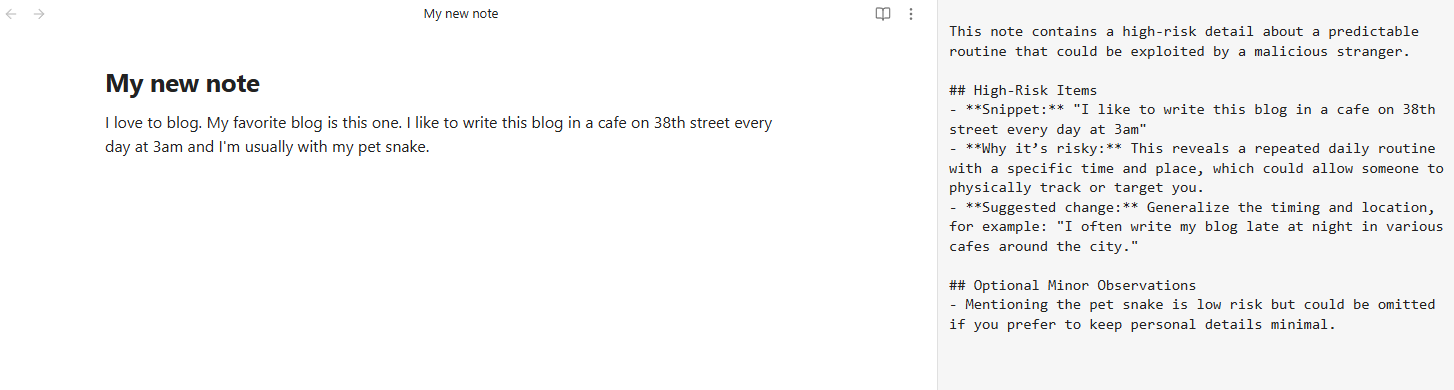
The plugin catches my reveal of a routine:
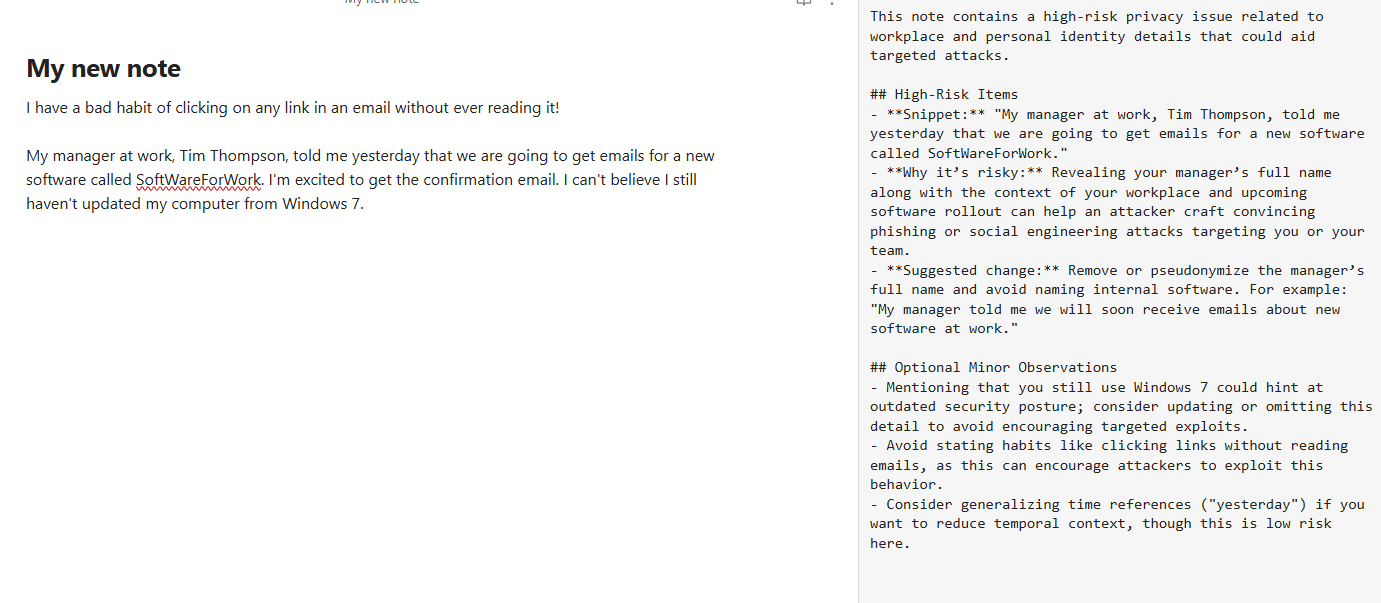
The plugin catches my reveal of corporate information:
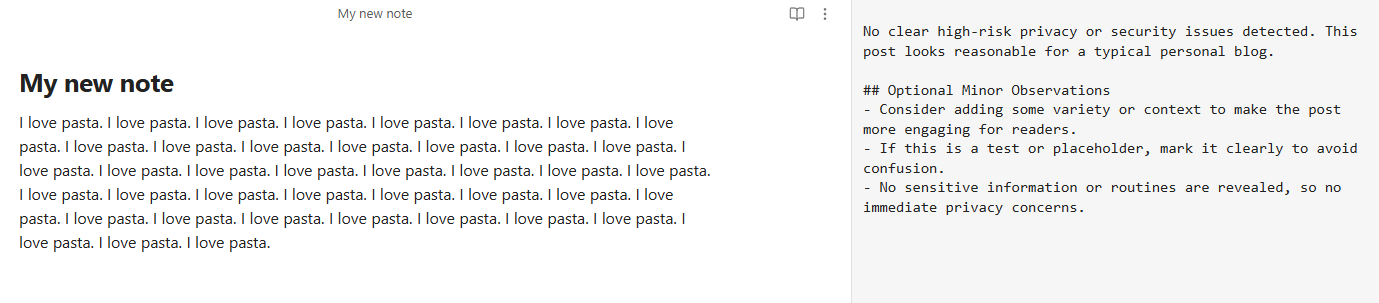
No issues with this one! It gives some extraneous suggestions about my clearly engaging content:
Areas for improvement
- Add a command to run an audit for every file in the vault individually and get a summary of suggested fixes for each
- Add a command to do a comprehensive audit across the whole vault, in case little bits of information in each file add up to a bigger picture (violating your privacy) which wouldn't be revealed within just one file. (This may be complicated since all the files won't fit in one GPT context window. There'd have to be some processing.)
- Add a similar audit to the Github pipeline that actually gets triggered when I publish a note, so I don't have to remember to manually run the audit within Obsidian. If there is a critical warning, maybe fail the job, or maybe just alert me somehow.
Concluding words
I have a feeling I might think of other AI-related Obsidian plugins in the future.
A retrospect from two days later
(2025-12-10) Retrospectively, what I mostly actually developed here was a GPT wrapper for a single-prompt analysis of the current note. The only thing making it a "security audit" plugin is the system prompt, which is modifiable in the plugin settings. So, anyone could actually change the system prompt for themselves and use it for something different. (This is a good/cool thing.)
Maybe I should instead have branded it as a generic GPT overlay. But I do also value the privacy focus because I feel like it's good to get people to think about it and give them a ready-made tool to do the privacy check up. So maybe I should make a separate plugin that has more emphasis on being a free-form AI tool.
But, without researching this at all, I'd guess that something like that already exists. GPT has been a thing for a while, and I'm sure that someone made a plugin to integrate a full chat into Obsidian. Fine, I'll check. Found this reddit post with some suggested plugins for this. I'm not discounting my own plugin, but maybe I don't need to expand it like I'm saying. At the same time, what I'm really suggesting here is a way for a user to set up any amount of custom commands which will execute one GPT system prompt on the active note. I could see this being a novel plugin idea.
2025-12-11
Also, I realize that there is some irony/concern with passing the potentially sensitive note content to AI to scan for said potentially sensitive content. The tradeoff is, do I want to reveal my personal details to the Internet, or reveal them to an AI (read: the corporation running the AI)?
Also, my PR for the Obsidian plugin has kind of stalled, and I'm not feeling much motivation to push hard on it. Might be something I just let float around until I feel more strongly about it. It's a really teeny tiny mini project, not a big deal.